
Kerala PSC Thulasi Login
Learn how to log in, register, and update your profile on the official Kerala PSC Thulasi portal. Step-by-step instructions for Kerala PSC candidates to apply for government jobs, check results, and manage their profiles online.
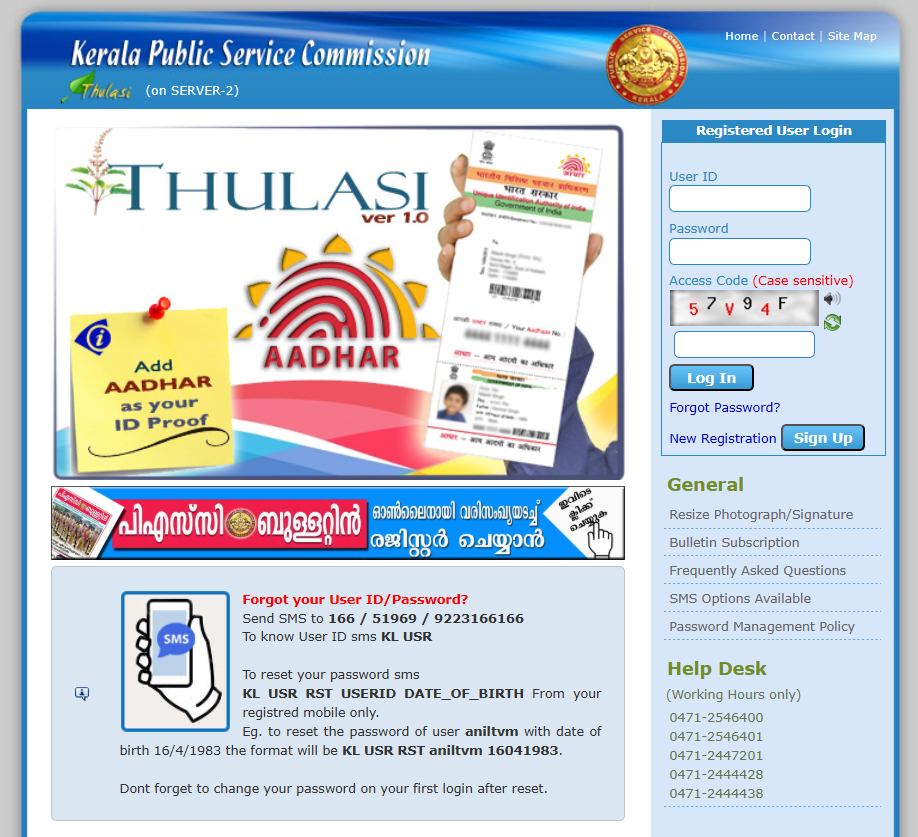
Kerala PSC Thulasi Login, Registration, and My Profile 2025 – Complete Guide
Introduction
The Kerala Public Service Commission (Kerala PSC) plays a crucial role in recruiting candidates for various government departments across the state.
To make the recruitment process more transparent and accessible, the commission introduced the Kerala PSC Thulasi portal — a user-friendly online platform where candidates can
register, log in, apply for jobs, check results, and receive notifications from one place.
Whether you’re a new applicant or an existing user, this guide will walk you through everything you need to know about Kerala PSC Thulasi login, registration, and My Profile management.
Kerala PSC Thulasi Login – Overview
The Kerala PSC Thulasi portal was launched to make the job application process faster, simpler, and fully digital.
Through this official website, candidates can apply for Kerala government jobs, monitor exam notifications, download admission tickets, and view shortlists and rank lists.
- Latest Kerala PSC job notifications 2025
- Exam schedules, results, and admit cards
- Profile management for registered candidates
- Recruitment updates and eligibility details
This centralized system ensures that every candidate has equal access to job opportunities and official updates.
How to Log In to Kerala PSC Thulasi (2025 Updated Steps)
Follow these steps to securely access your Kerala PSC Thulasi account:
- Visit the official Kerala PSC Thulasi Login page.
- Enter your User ID, Password, and Access Code (Captcha).
- Click on the “Login” button.
- You’ll be redirected to the My Profile page, where you can view or edit your details.
Note: Your User ID and Password are case-sensitive, so make sure you enter them correctly.
Kerala PSC Thulasi My Profile
After logging in, you’ll land on your My Profile page — the central dashboard of your Kerala PSC account.
This section contains all your personal and educational details, including:
- Full Name and Date of Birth
- Contact Details
- Educational Qualifications
- Reservation and Caste Information
You can also use this page to:
- Update your photo and signature
- Edit or correct your profile details
- Track application history and status
Keeping your My Profile updated is essential for receiving accurate notifications and avoiding issues during recruitment or document verification.
Kerala PSC Thulasi New Registration 2025
If you’re a new user, you need to complete your Kerala PSC Thulasi one-time registration before applying for any posts. Follow these steps:
- Go to the official Kerala PSC Thulasi Registration page.
- Click on “New Registration.”
- Fill in your personal details, educational qualifications, and contact information.
- Upload a recent passport-size photo and digital signature as per the given specifications.
- Review all details carefully and click “Submit.”
After successful registration, you’ll receive a User ID and Password which you can use to log in to the Thulasi portal and apply for Kerala PSC vacancies.
Important Kerala PSC Thulasi Links
Quick Tips for Kerala PSC Candidates
- Always log in through the official website to avoid fake portals.
- Keep your User ID and Password safe and confidential.
- Update your profile, photo, and signature periodically.
- Regularly check for new job notifications and exam updates.
- Use a desktop browser for smooth performance during uploads or applications.
Conclusion
The Kerala PSC Thulasi portal has made the state’s government job recruitment process simple, transparent, and completely online.
By completing your Thulasi registration and keeping your profile updated, you can apply for various PSC vacancies, stay informed about upcoming exams, and manage all your applications easily.
Whether you’re preparing for your first Kerala PSC exam or managing multiple applications, mastering the Thulasi login and registration process is the first step toward a successful government career in Kerala.
How to Log In to Kerala PSC Thulasi Portal
The Kerala PSC Thulasi portal is the official website for all Kerala Public Service Commission (PSC) candidates. You can log in to check notifications, results, and exam details in just a few steps.
Follow these steps to log in:
- Visit the official Kerala PSC Thulasi Login page.
- Enter your User ID, Password, and Captcha code correctly.
- Click the Login button to access your PSC profile securely.
- Once logged in, you can check Kerala PSC results, update your profile, and apply for new posts.
💡 Tip: Always use the official Kerala PSC Thulasi website to avoid fake links or phishing pages.
Content Summary :
How to Log In to Kerala PSC Thulasi
- Visit the official Kerala PSC Thulasi portal.
- Enter your User ID, password, and captcha code.
- Click Login to access your account securely.
- Use the Direct Link provided to check your PSC Results.